





Conversion rate optimization for Shopify brandsTry it free for 14 days

Customer story / Fulton

CRO changes that feel like Fulton.

For Fulton founder Libie Motchan Duggal, the surprise was how naturally HI Engine’s changes fit the brand. Building and launching CRO tests felt easy, and the work looked and felt like Fulton.

Customer
Fulton
Founder
Libie Motchan Duggal
Platform
Shopify
With HI Engine
CRO tests, built and launched
Impact, in Libie’s words
Conversion rate, engagement rate and AOV

A test is only worth it if it looks like the brand.

For a brand-led store, a change can lift a number and still feel wrong on the page: words the brand would never use, a colour that isn’t theirs, a layout that looks like a template. What surprised Libie was how naturally HI Engine’s changes fit Fulton.

Fulton: beige felt slippers with the Fulton name on the side, worn on a sofa beside a sleeping boxer

In Libie’s words

“HI Engine feels like magic; the opposite of AI slop. Building and launching CRO tests is so easy, I keep thinking, ‘Wait, it can actually do that?!’ At Fulton, it’s meaningfully impacted our conversion rate, engagement rate, and AOV.”
Libie Motchan DuggalFounder, Fulton

Why the work looked like Fulton.

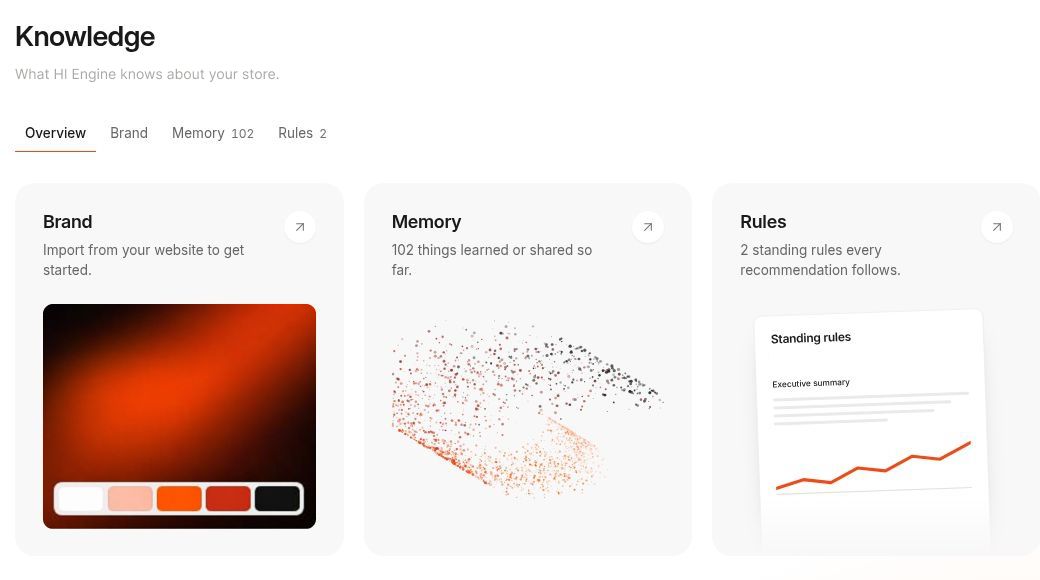
HI Engine’s Knowledge brings Brand, Memory and Rules into one place, giving the workflow context about the store. The product view below shows where that context lives.

  • Brand

    The store’s own look, imported from its website.

  • Memory

    What HI Engine has learned or been told about the store, kept as context for the work.

  • Rules

    Standing rules every recommendation follows.

HI Engine Knowledge with Brand, Memory and Rules. Store identity anonymized.Open full size ↗ (opens in a new tab)

From idea to live test.

“Building and launching CRO tests is so easy,” Libie says. Every test runs the same four steps, and nothing reaches the store without the team’s approval.

  1. Identify

    HI reads your Shopify data, analytics and customer feedback to find where shoppers get stuck.

  2. Build

    It writes the fix into your theme and puts it on a draft theme for you to preview.

  3. Approve

    You review the change on your own store. Nothing goes live until you approve it.

  4. Test

    HI A/B tests the change against your current page, so you see whether it helped.